Generate motion between two images — locally, with controlled prompting
Turn images into video. On your machine.
First + last frame • Positive / negative prompts • Local-only AI
PictaMotus is an AI image-to-video generator that creates intermediate frames between a start image and an end image. You can steer motion and style with a positive prompt and block unwanted artefacts with a negative prompt. Output is saved as MP4 locally, without sending frames or prompts to external servers.
COMMERCIAL USE: FREE
DATA FLOW: OFFLINE
CONTROL: POS/NEG PROMPTS
PLAYBACK: UP TO 30 FPS
MAX AREA: UP TO 1609
Access requirement: PictaMotus is free for commercial use, but it requires a valid license and a password.
Contact Virtuo to confirm you are a company or a professional (B2B eligibility) and to receive access credentials.
How it works
- Choose a first frame (start image) and a last frame (end image).
- Write prompts: a positive prompt for motion/style, and a negative prompt for what to avoid.
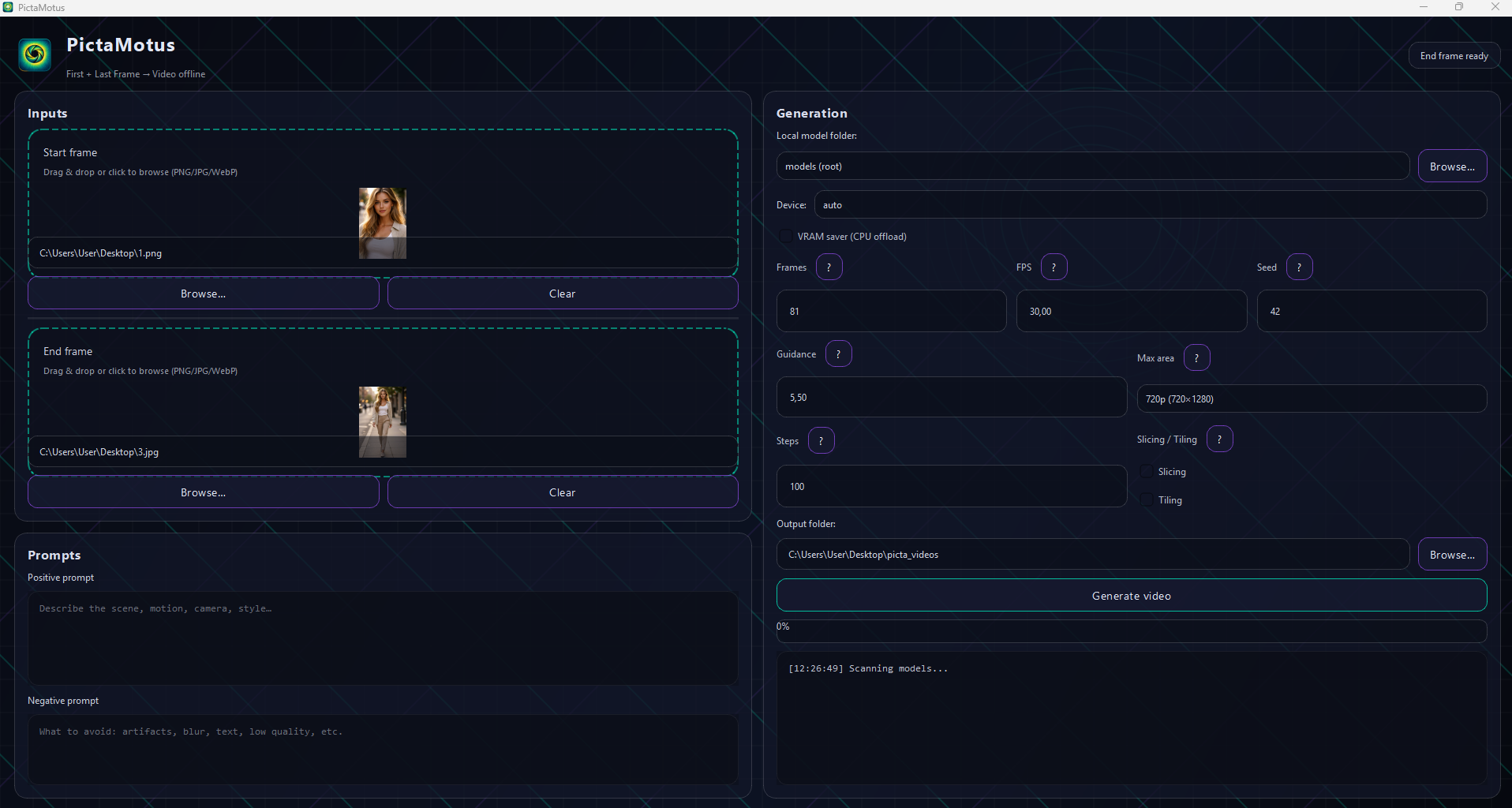
- Set timing: pick Frames and FPS (up to 30 FPS) for the playback speed.
- Generate: the model synthesises intermediate frames and writes an MP4 to your output folder.
Core idea: you define the endpoints; the AI invents the in-between — locally.
Controls & prompts
- Frames: more frames = longer video (constraint: (Frames − 1) ÷ 4 must be an integer).
- Steps: quality/time trade-off (more steps = slower, usually better).
- Guidance: how strongly the model follows prompts (typical range: 4.5–6.0).
- Max Area: internal resolution cap (up to 1609) — affects detail and VRAM usage.
- Seed: reproducibility when you want the same result again.
Prompts: positive = what you want; negative = what you refuse to see.
Performance modes
- CUDA (recommended): runs on NVIDIA GPU. Practical baseline is > 16 GB VRAM.
- CPU fallback: supported, but slow — a few seconds of video can take hours.
- VRAM optimisations: slicing / tiling and CPU offload can reduce peak memory.
- Offline by default: once installed and activated, generation does not require internet.
Reality check: if you want predictable throughput, you need CUDA and a serious GPU.
Hardware recommendations
- Minimum practical: NVIDIA GPU with 64 GB VRAM (CUDA required).
- Ideal (workstation-grade):
- NVIDIA RTX PRO 6000 Blackwell Workstation Edition, 96 GB GDDR7 with ECC, Blackwell, Dual-slot, PCIe Gen 5 x16, Full Height, Full Length — HIGHLY RECOMMENDED
- NVIDIA H100 PCIe, 80 GB HBM3, Hopper, Dual-slot, PCIe Gen 5 x16
- NVIDIA A100 PCIe (80 GB version), 80 GB HBM2e, Ampere
- NVIDIA A16 PCIe, 64 GB GDDR6 (4x 16 GB), Ampere, Dual-slot, PCIe Gen 4 x16
CUDA is non-negotiable if you expect this to behave like a tool, not a weekend hobby project.
First launch & access flow
- First launch: Terms & Conditions must be read to the end before acceptance is enabled.
- Password required: access is provided after B2B verification via Virtuo.
- Licenses exist: Trial, Monthly, Annual, and Lifetime.
- All variants are $0: difference is access window and operational controls, not price.
Intent: controlled distribution and predictable support — not payment.
Responsible use
- Use frames you own or have explicit permission to use.
- Don’t impersonate or produce misleading content that could reasonably deceive.
- Keep work local when confidentiality matters.
- Validate outputs before publishing: artefacts and unexpected motion can happen.
GUI Preview
Click image to enlarge