Protect your screen from side-glances
Secretum is a privacy application for PCs. It uses the webcam to estimate where you are looking and, based on that, it blurs and/or dims everything on the screen except the area where your focus is. The idea is simple: anyone beside you sees fog and shadow; you keep your working area readable.
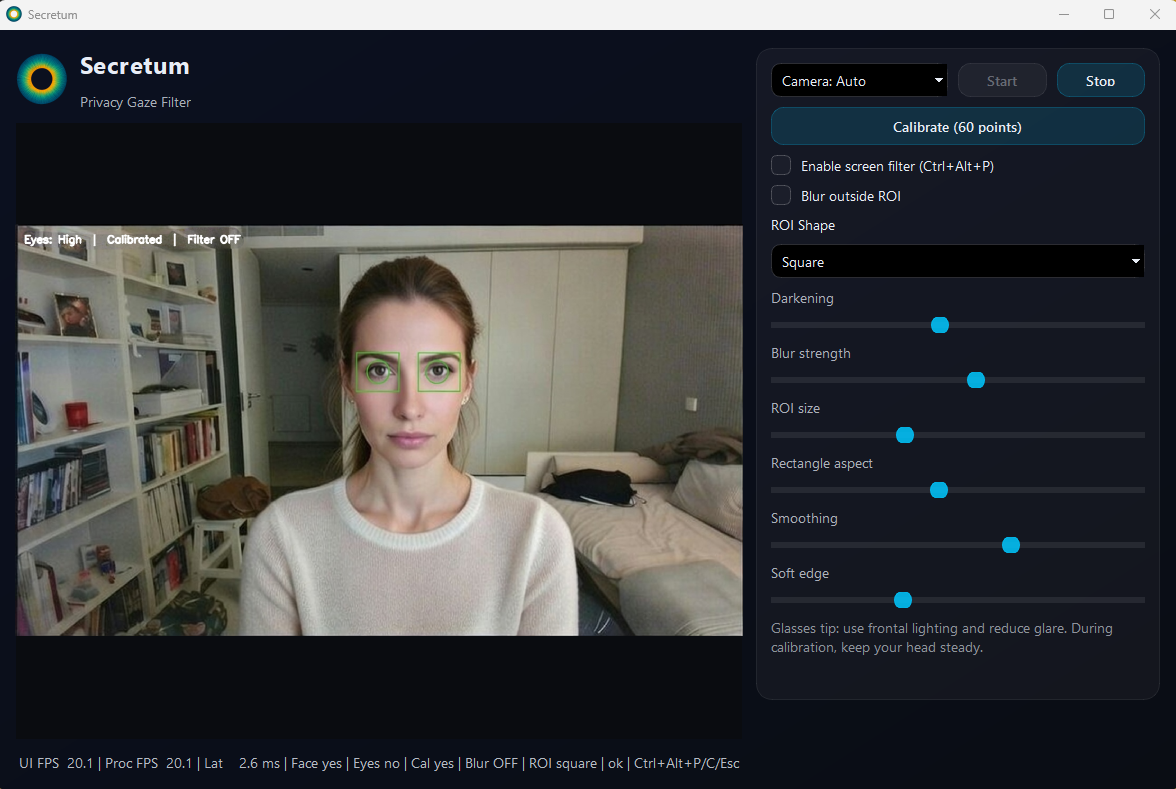 App interface
What it does
Secretum continuously estimates your visual focus using the webcam and applies a privacy filter to the screen: the focus area remains clear while everything outside becomes blurred and/or dimmed.
This is designed to reduce shoulder surfing in offices, courtrooms, meetings, coworking spaces, and public transport, where sensitive information is often visible to bystanders.
For real precision, Secretum supports a 60-point calibration. Calibration significantly improves stability and accuracy.
Calibration: 60 points • Goal: higher precision • Result: stronger privacy effect
Security & Blackout
When privacy can no longer be guaranteed, Secretum reacts aggressively (by design):
- If the face disappears from the camera → BLACKOUT (full black screen).
- If both eyes are not detectable for 30 seconds → BLACKOUT.
- If a stored facial “imprint” exists and a different face appears → BLACKOUT (wrong face).
Exiting blackout is equally strict:
- If the user moves the mouse while in blackout, the app prompts for the Windows password and unlocks only if it is correct.
Blackout is a safety layer: if the system cannot trust what it sees, it blocks.
Practical value
Shoulder surfing reduction
- Reduces lateral glances and opportunistic reading by nearby people.
- Useful in crowded or sensitive environments.
Sensitive work protection
- Documents, email, client data, messages, numbers, internal systems.
- Helps keep “non-viewable by default” behavior on shared spaces.
Calibration for precision
- 60-point calibration for higher accuracy.
- Without calibration it can still operate, but with lower precision.
Fail-safe security layer
- Blackout triggers on missing face/eyes or wrong face.
- Windows password required to unlock via mouse movement.
Real limitations
Lighting & camera dependency
- Tracking quality depends on good lighting and a working camera.
- Low light, motion blur, and camera issues degrade performance.
Glasses & reflections
- Glasses and reflections can reduce tracking quality.
- Calibration helps, but cannot defeat bad optics.
Primary screen focus
- The overlay is designed for the primary display in this version.
- Multi-monitor is not the focus here.
Calibration matters
- Calibration improves accuracy significantly.
- Skipping it is possible, but you are choosing worse results.